
Maintenance Reminder - Info and Resetting InstructionsUpdated a month ago
All Aquafire Original* (Generation 3 - AWA3) and Aquafire Pro* (Generation 3 - AWPR3) come equipped with a 6-month Maintenance Reminder Setting. This setting was already activated when you received your Aquafire.
This reminder is to ensure you are sticking to a regular maintenance and cleaning schedule. Regular cleaning - see our Preventative Maintenance Guide - ensures longevity and efficient operation of your Aquafire.
The Maintenance Reminder occurs when you see 3 indictor lights on the control module flash simultaneously. They will flash 8 times and then stop. There is no sound alarm and the flashing does not affect the normal operation of the fireplace. The flashing will occur every time you turn on your Aquafire Original or Aquafire Pro until it is reset.
It can be turned off and reset using the instructions below:
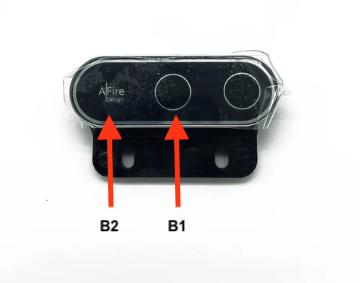
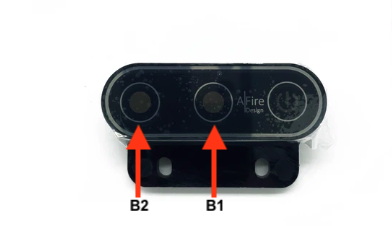
- Press and hold the Water Inlet Button (B1) and the Drain Button (B2) simultaneously for approximately 5 seconds.
- After hearing 4 beep sounds (beep, beep, beep, beep), the maintenance reminder reset is completed and the flashing will cease.
- It will flash again in 6-months, as the next reminder to complete a Preventative Maintenance Cleaning.
Aquafire Original (AWA3) Control with Logo
(Some AWA3s will have a Logo over the B2 button and some will have a clear button. In both instances, that spot will still flash and can be pressed to reset the maintenance reminder)
Aquafire Pro (AWPR3) and Aquafire Original (AWA3) Control
*Not available on the Aquafire Lite (AWL)